Where your traffic comes from, across every site
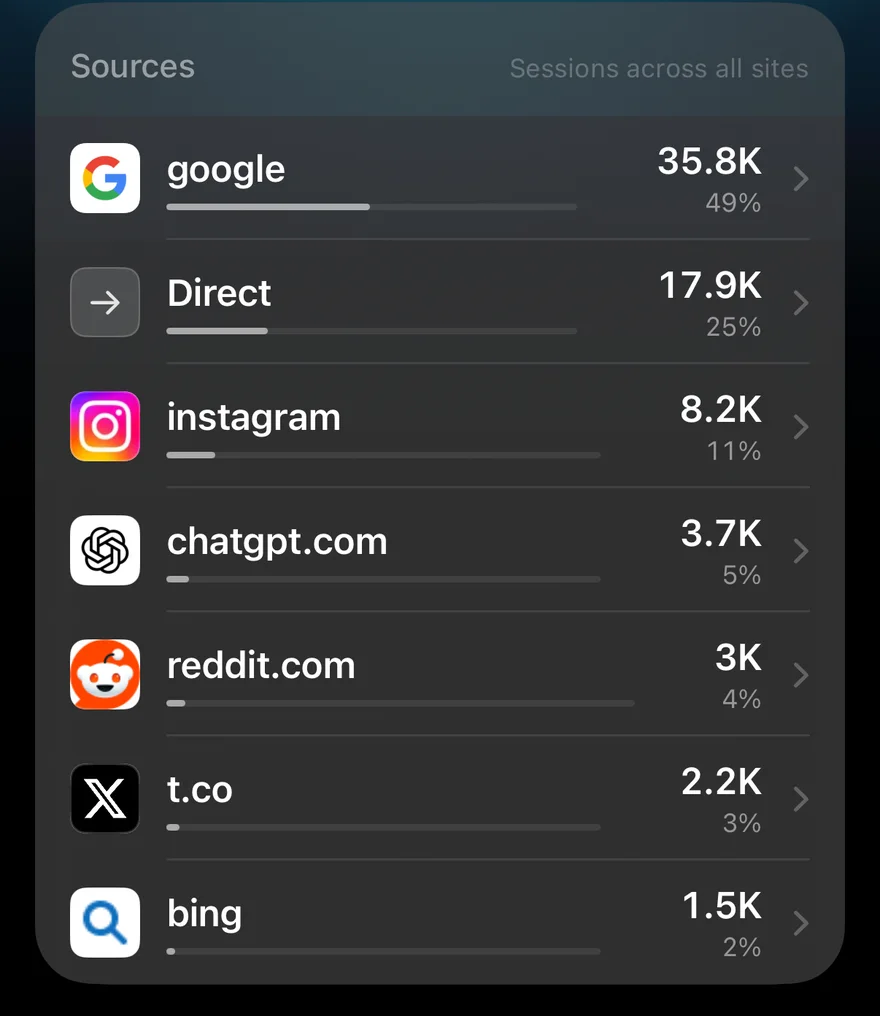
The Sources tab on the dashboard shows where sessions came from across all your sites at once: search engines, social networks, newsletters, other websites and AI assistants.
Every source, with its icon
Each row has the source's own icon (Google's, Reddit's, ChatGPT's), its sessions for the time frame and its share of the total. Sources that are websites get their real site icon; channels without one, such as Direct, get a symbol.
AI assistants included
More and more visits arrive from AI tools. When ChatGPT, Perplexity or another assistant passes its address along, it appears in the list like any other site, so you can see how much of your traffic AI answers send, and to which of your sites.
Per site, too
Each site's own page has a Sources section for that site alone, next to countries and devices. Since build 28 on iPhone, you can also tap a source on the dashboard to open its own page: see one page for every traffic source.